



Help centreAccount & billing
Plans and billing
Upgrade to Pro, manage or cancel your subscription, download invoices, and fix a payment that hasn't switched on.
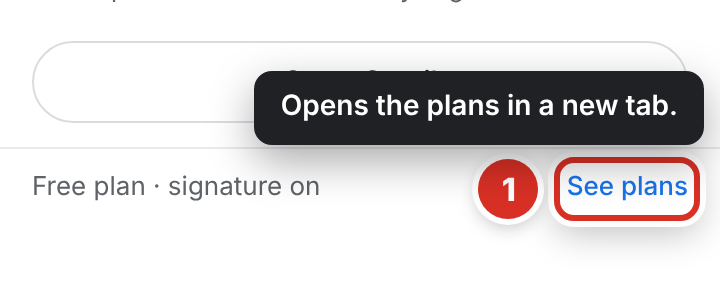
Quick answer: Upgrade from See plans in the toolbar popup or the Gmail sidebar; checkout opens in a new tab. Pause, cancel or resume in TrackMy.Email icon → ⚙ Settings → Subscription, or on your account page → Manage subscription for card and invoices. Cancelling keeps Pro until the end of the paid period.
TrackMy.Email has a free plan with unlimited tracking; Pro adds full history, link-click tracking, “not opened in 48 hours” alerts and removes the badge. See the pricing page for current plans and prices.
Who bills you
Payments are handled by Lemon Squeezy, our merchant of record — the company that processes the payment and adds tax where required. We never see your card details.
Upgrade
- Click See plans ① in the toolbar popup or the Gmail sidebar, or open the pricing page.
- Choose Pro (billed yearly). Checkout opens in a new tab.
- Pay with the same email address you use for TrackMy.Email. Pro switches on as soon as the payment is confirmed.
Manage your subscription
Sign in at trackmy.email and open your account page. On a paid plan, click Manage subscription to open your billing page — already signed in — where you can pause, cancel, change your card and download invoices. In the Chrome extension, Settings → Subscription has Pause, Cancel and Resume buttons too.
Pausing stops charges and moves you to the Free plan until you unpause (or until the date you picked). While paused, the popup, the Gmail sidebar and CheckMyEmail say Pro · paused with an Unpause button — you don’t need to buy again.
Cancelling keeps your paid features until the end of the period you paid for, then your account returns to the Free plan. Your tracking history is kept.
I paid but I’m not on Pro yet
Your plan shows by itself within a minute or two — when you open the popup, Settings or the Gmail sidebar. You don’t need to sign out.
- Check that you signed in to TrackMy.Email with the same email address you used at checkout. A purchase made with another address is attached when that address signs in.
- Reload Gmail and open the toolbar popup again.
Still stuck? Email [email protected] with the email address on your receipt — never your card details.
Still stuck? Email [email protected].