


Help centreGetting started
See all your tracked emails
Check every tracked email at a glance in the toolbar popup, and search your full history on your account page.
Quick answer: Click the TrackMy.Email icon in the Chrome toolbar to see your recent tracked emails and whether each was opened. For every tracked email, with search and filters (All, Opened, Not opened, Clicked), sign in at trackmy.email and open your account page.
Besides the checks in Gmail, there are two places to see all your tracked emails at once: the toolbar popup and your account page.
In the toolbar popup
Click the TrackMy.Email icon in the Chrome toolbar. You see your most recent tracked emails ①, each with its state: a green check with how many times it was opened and when, or a grey check with “not opened yet”.
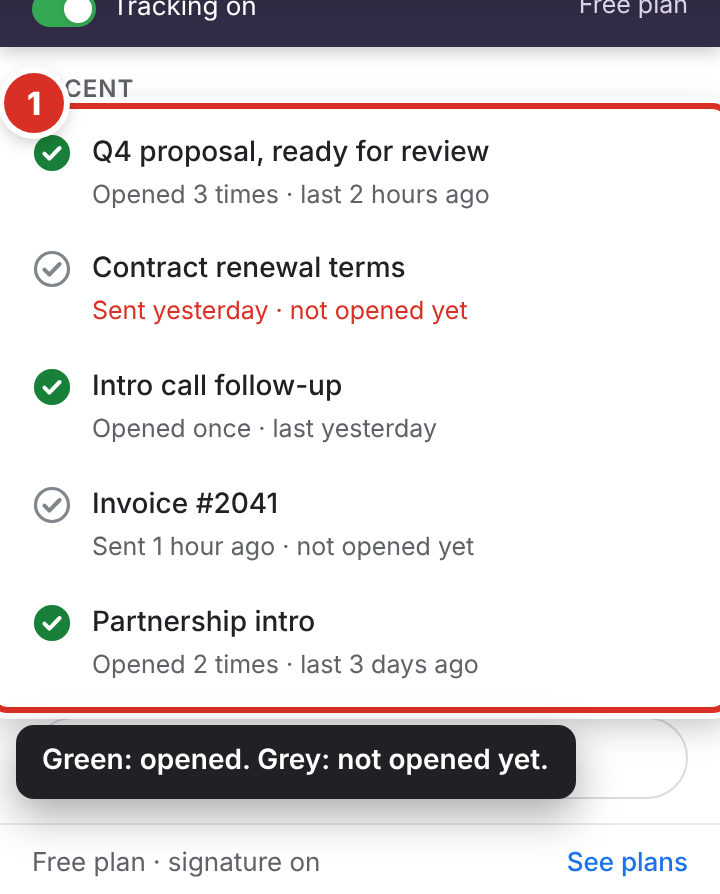
- Emails that still haven’t been opened a day after you sent them are shown in red — a cue to follow up.
- Click an email to open its conversation in Gmail.
- The number on the toolbar icon counts new opens; it clears when you open the popup.
- New to TrackMy.Email? The popup also shows a short Getting started checklist until you get your first open.
On your account page
Sign in at trackmy.email and open your account page to see every tracked email in a list.
- Use the search box to find an email by subject or recipient.
- Filter with All, Opened, Not opened or Clicked.
- Click an email to see its opens and, on Pro, its link clicks.
The Free plan shows the last 7 days of history. Pro shows your full history.
To see opens inside a single conversation, see See who opened your email.
Still stuck? Email [email protected].