


Help centreTroubleshooting
My email shows as not opened
What to check when an open doesn't show up, or notifications don't arrive.
Quick answer: Email still grey? Most often the recipient’s app hasn’t loaded images, or the email went out with Tracking off. No notifications? Check TrackMy.Email icon → ⚙ Settings → Notifications → Desktop notifications is on and that your computer allows notifications from Chrome.
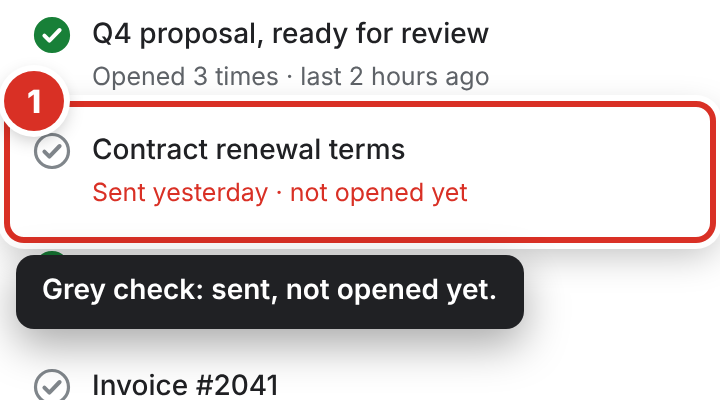
A grey check means the email was sent but no open has been recorded yet. Work through these checks, most common first.
Check the email’s own status
Open the toolbar popup. Each recent email shows its state ①: a green check with how many times it was opened, or a grey check with “not opened yet”.
It stays grey
- Your recipient hasn’t loaded images. An open is recorded when their email app loads images. Many apps ask first, so an email can be read without an open being recorded.
- Tracking was off for that email. If the compose window said Tracking off, the email went out without a tracker.
- You weren’t signed in when you sent it. The compose window then says “sign in to track this email”. Sign in, and the next email you send is tracked.
- You opened it yourself. Your own views are never counted as opens. To test, open the email on another device (your phone) or in another browser where TrackMy.Email isn’t installed.
- It’s older than 7 days on the Free plan. The Free plan shows the last 7 days; older emails need Pro.
- It shows one open, but they opened it several times. Gmail and Yahoo keep the image after the first open, so later opens in those apps usually aren’t visible. Apps that load the image each time show every open.
- It was opened within a minute of sending, in an app other than Gmail (Yahoo, Outlook…). An open in the first minute is set aside, because it could be your own view. It shows the next time the recipient opens the email. Opens in Gmail count at once.
- Gmail says “TrackMy.Email was updated”. The extension updated while Gmail was open, so that Gmail tab can’t reach it: Sign in doesn’t work there and emails go out untracked. Click Reload Gmail in the compose bar or the sidebar (or press F5). Your draft stays in Drafts. If you press Send first, it asks once; pressing Send again sends the email without tracking.
Gmail and some other apps load images through their own servers. Those opens are shown honestly as via Gmail, without a location.
Notifications don’t arrive
- Check Settings → Notifications → Desktop notifications is on, and that quiet hours (Settings → Notifications → Quiet hours) aren’t on right now.
- Check that your computer allows notifications from Chrome.
- The toolbar icon still counts new opens — click it to see them.
Still stuck
Email [email protected] with the subject of the email and roughly when you sent it. Never send passwords or card details.
Still stuck? Email [email protected].