


Help centreUsing it
Get notified when it's opened
Get a desktop notification when a tracked email is opened, choose how often we check while Gmail is closed, or turn notifications off.
Quick answer: Desktop notifications for opens are on by default. Turn them on or off in TrackMy.Email icon → ⚙ Settings → Notifications → Desktop notifications. Change how often opens are checked while Gmail is closed in Settings → Notifications → Check for opens when Gmail is closed (every 5 minutes by default).
TrackMy.Email shows a desktop notification when someone opens a tracked email — for example “Ana Ruiz opened “Q4 proposal””. Click it to open the email in Gmail.
- While Gmail is open, we check every minute, so the notification comes within a minute of the open.
- While Gmail is closed (Chrome still running), we check every 5 minutes by default. If several emails were opened while you were away, you get one summary instead of a pile of pop-ups.
- With Desktop notifications off, nothing is checked while Gmail is closed. Your opens are still recorded — you’ll see them next time you open Gmail.
Turn notifications on or off
- Click the TrackMy.Email icon in the Chrome toolbar, then the settings icon (⚙).
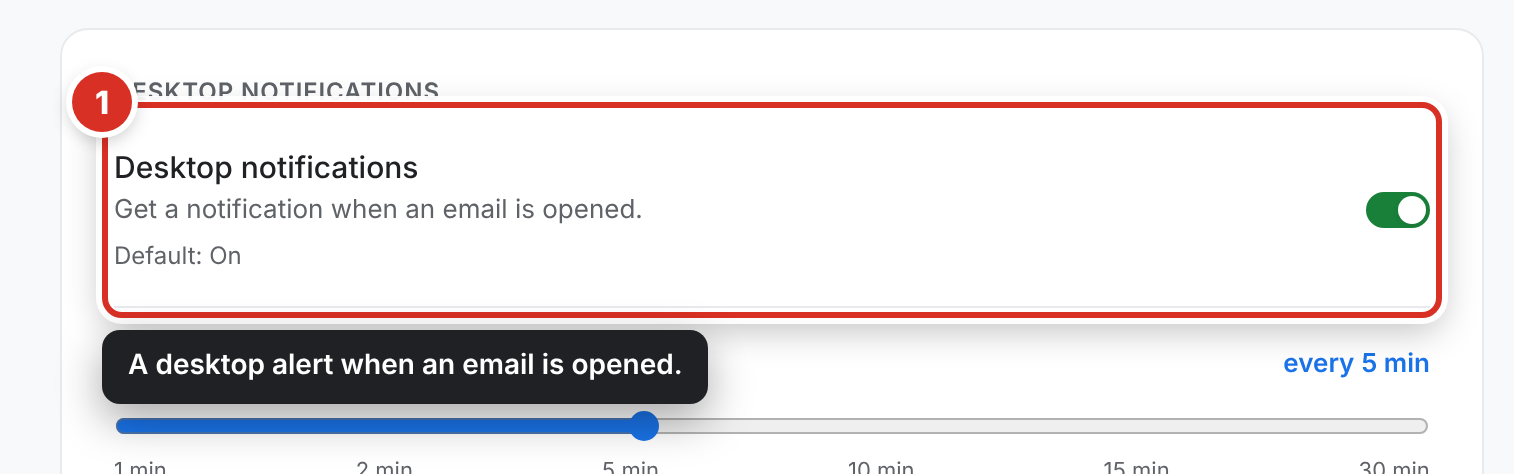
- Open the Notifications tab and use Desktop notifications ① — on by default.
The toolbar icon still shows how many new opens you have, even with notifications off.
Choose how often we check while Gmail is closed
Under Desktop notifications, drag Check for opens when Gmail is closed to 5, 10, 15 or 30 minutes (5 by default; 1 and 2 minutes are Pro). Longer means fewer checks; you’ll still see everything when you open Gmail. The setting is saved on this computer.
Quiet hours (Pro)
Go to Settings → Notifications → Quiet hours, switch it on (off by default) and choose the times and days. No pop-ups during those hours; opens are still recorded and the toolbar count keeps updating. A night counts for the day it starts, so 10 PM to 7 AM on Friday covers Friday night. CheckMyEmail follows the same schedule, and you can change it in either extension.
On Pro
Pro can check as often as every 1 or 2 minutes while Gmail is closed. Pro also notifies you when a tracked link is clicked, and when an email “hasn’t been opened in 48 hours” — a reminder to follow up.
No notifications at all? Chrome may not be allowed to show notifications on your computer. Check your system’s notification settings for Chrome.
Still stuck? Email [email protected].